 LuLuMate
Everything LuLuMate does
One app for everyday mowing and the extras — on any phone, tablet or computer, for everyone in the house.
See it working
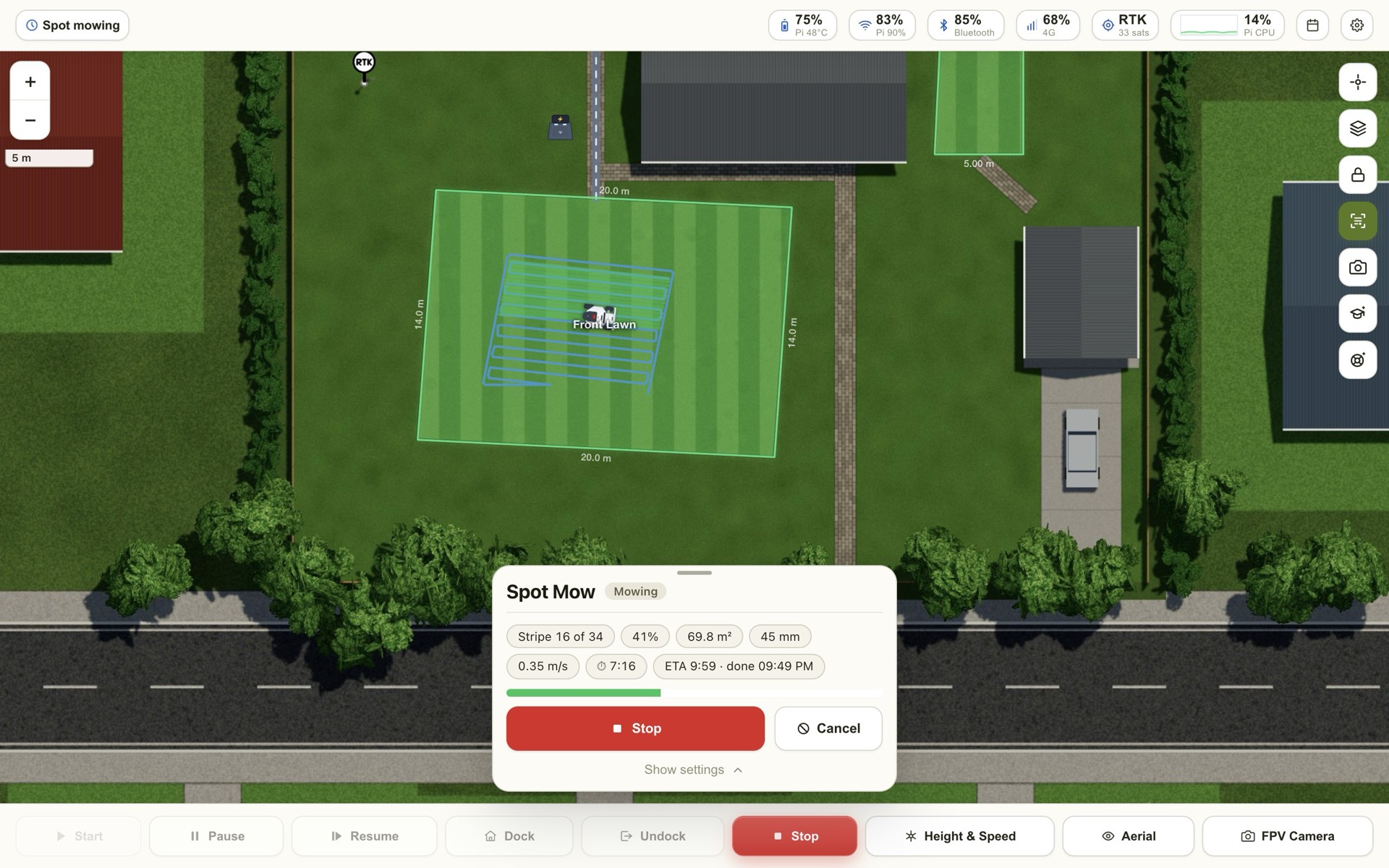
Here's the spot mow in action: draw the bit that needs a cut, press Start, and watch the stripes fill in.
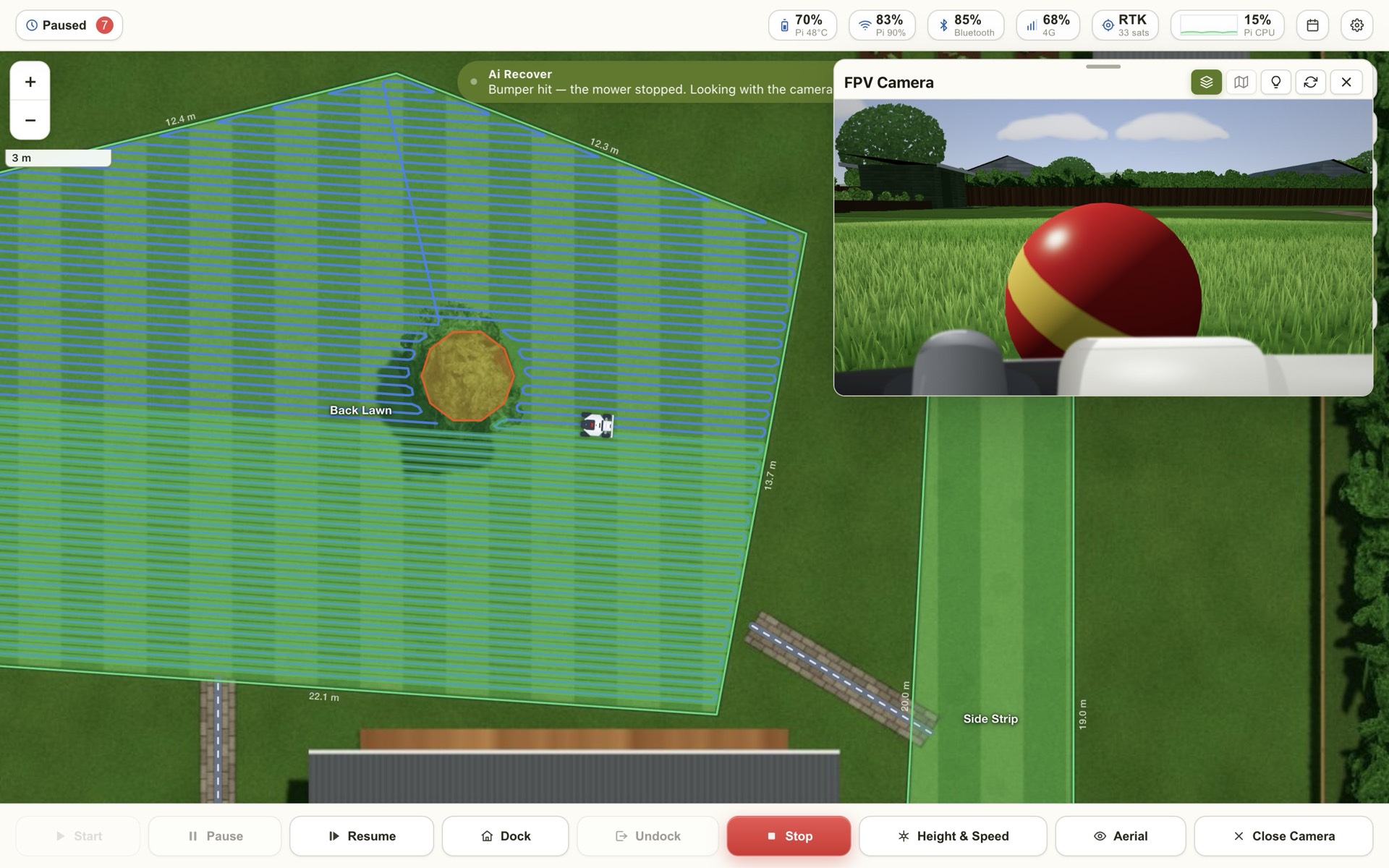
Watch Ai Recover
What happens when the mower bumps into a ball on the lawn — the bump, the picture, your OK, and back to mowing. With video and every step.
Mowing
Everyday controls
Start, pause, dock, undock and stop, with the options the Mammotion app offers — height, speed, spacing, path, angle, laps, obstacle detection — filled in from each area.
Schedules
View, add, edit and run the mower's own schedules, in a clear weekly editor.
Spot mowing
Mow any shape you draw, a strip along a line, or a whole area — zig-zag, spiral, checkerboard or diagonal, with outline laps. Saved spots, a queue and spot schedules.
Missed patches
After each mow it compares where the blades went with the area it should have covered, shows what was missed, and mows just those bits.
Rain delay
Watches the forecast and holds the mower's schedules when it's wet, then lets them run again.
Drive by hand
A joystick for moving the mower yourself, with a speed limit and manual mowing.
Seeing and knowing
Live camera
The mower's own camera, with the headlamp, in a window you can move and resize.
A proper map
Sharp street maps and aerial photos, your lawn areas, the mowing route, and the mower drawn to scale as it moves.
RTK signal map
Your lawn in 50 cm squares, coloured by how good the position fix was there — so you know where to move the base station.
History
Where it mowed and when, a "last cut" colouring of the lawn, and pins on obstacles it found.
Health
Blade hours with a reminder to change them, total mowing time and distance, battery history, and recent faults.
Phone alerts
Finished, stuck, battery low, offline, rain delay, maintenance and theft — you choose, on each device.
Smart and safe
Ai Recover
Gets the mower out of trouble — stuck, bumped, weak position, missed dock — using the camera Ai, your notes and the map. It can ask you before it moves.
Ai Training
Teach it your garden: mark the dock, things to avoid, and record a drive back to the dock it can repeat.
Theft alarm
Armed on the dock or all the time. If it is lifted or moved: alerts with its position, flashing headlamp, a photo, its trail on the map, and locked controls.
Safety first
Every move it makes stops the instant a bumper, lift, tilt or slip sensor trips, or the emergency stop is pressed.
Automatic updates
New versions install themselves overnight while the mower is docked. Every update is signed; if one ever fails, the old version comes back by itself.
Private by design
It runs on the unit on your mower. Sign-in with HTTPS, admin and user roles, and backups that never include passwords or keys.
Fits your home
Home Assistant
Point it at your broker and the mower appears by itself: a lawn mower you can start, pause and dock, plus battery, status, RTK, position and the theft alarm.
Siri & other apps
API tokens for Siri Shortcuts, scripts and other apps.
The whole family
Add everyone: admins look after settings and users; users mow and drive.
Looks the way you like
Sixteen light and dark styles, switching at sunrise and sunset if you want.
Easy Wi-Fi
Its own setup hotspot for joining your Wi-Fi, and it looks after the connection by itself.
A real manual
A full guide to every screen and setting, in the app and on this site.
Ready to give your LUBA superpowers?
See the options and order online.